Description
The Propose New Code Value workflow is an out-of-the-box Workflow Definition that allows for the creation of a Code Value in Data Governance Center. The Code Value will be created using the entered characteristics and placed in the Data Governance Council Community.
Which roles are involved?
There are no specific roles assigned to this workflow.
Who can start the workflow?
Out of the box, any signed in user can start the workflow
What status transformations happen in this workflow?
New Code Values are created with a status of Candidate.
Walk Through
Diagram

Start the Workflow
Start the workflow from the dashboard
Dashboard

Dashboard > Propose Code Value Button

Result
DG Council Community > New Processes Domain > PR

This is the default domain for new Code Values to land. This can be configured using the Configuration Variables.
Configuration
Settings > Workflows > Definitions > Propose New Code Value

Description
Settings > Workflows > Definitions > Propose New Code Value > Description

This process can be used to propose new code values. The term will be created using the entered characteristics and placed in the "Data Governance Council" community.
Applies To
This Workflow Definition applies at the Global level. It is accessible at the from the dashboard.
Settings > Workflows > Definitions > Propose New Code Value > Applies To

Applies To: Global
Configuration Variables
Settings > Workflows > Definitions > Propose New Code Value > Variables

Important Variables to Configure:
| Variable | Title | Default Value | Description |
|---|---|---|---|
| intakeVocabulary | Enter the id of the vocabulary to take in the created term | 00000000-0000-0000-0000-000000006014 | Out of the box, new Business Assets are created in the New Reference Data Domain within the DG Council Community |
Start Label
The start label is configured in the upper right corner of the page.This is the label that is shown to the users when they are allowed to start the workflow. The name can be changed by pressing the Edit button and filling in a new label.
Settings > Workflows > Definitions > Propose New Code Value > Start Label

Start Label: Propose Code Value
Start Events
There are currently no start events for this Workflow Definition.
Settings > Workflows > Definitions > Propose New Code Value > Start Events

Start Events: None
Roles
Roles for the workflow are assigned here.
Settings > Workflows > Definitions > Propose New Code Value > Roles
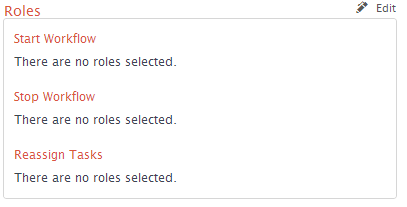
| Setting | Value | Description |
|---|---|---|
| Start Workflow | None | No role is specified to start the workflow. Settings in the "Other" section below overwrite this setting |
| Stop Workflow | None | No role is specified to stop the workflow once it is started |
| Reassign Tasks | None | No role is specified to Reassign Tasks once started |
Other
There is currently no users assigned in this section either. They do not need to be assigned for this sub-process.
Settings > Workflows > Definitions > Propose New Code Value > Other
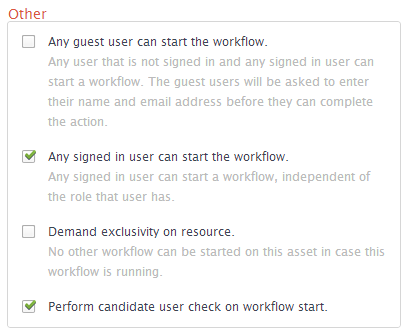
| Setting | Value |
|---|---|
| Any guest user can start the workflow | No |
| Any signed in user can start the workflow | Yes |
| Demand exclusivity on resource | No |
| Perform candidate user check on workflow start | Yes |
Attachments:
 image2014-5-2 11:45:47.png (image/png)
image2014-5-2 11:48:43.png (image/png)
image2014-5-2 11:55:0.png (image/png)
image2014-5-2 11:56:16.png (image/png)
image2014-5-2 11:58:27.png (image/png)
image2014-5-2 11:59:50.png (image/png)
image2014-5-2 12:0:32.png (image/png)
image2014-5-2 12:0:54.png (image/png)
image2014-5-2 11:45:47.png (image/png)
image2014-5-2 11:48:43.png (image/png)
image2014-5-2 11:55:0.png (image/png)
image2014-5-2 11:56:16.png (image/png)
image2014-5-2 11:58:27.png (image/png)
image2014-5-2 11:59:50.png (image/png)
image2014-5-2 12:0:32.png (image/png)
image2014-5-2 12:0:54.png (image/png)
 image2014-5-2 12:1:30.png (image/png)
image2014-5-2 12:3:48.png (image/png)
image2014-5-2 12:4:17.png (image/png)
image2014-5-2 12:1:30.png (image/png)
image2014-5-2 12:3:48.png (image/png)
image2014-5-2 12:4:17.png (image/png)